


AVG Secure VPN Proxy & Privacy
4.36.99K Reviews
App Specs
- Version
- 3.2.6686
- Updated On
- License
- Free
- Downloads
- 10,000,000+
- Developer
- AVG Mobile
- Categories
- Tools
- Platform
- Android
Screenshots
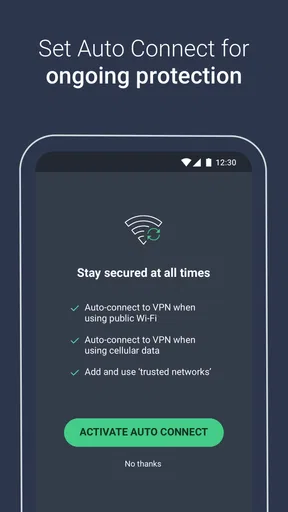
 Analysis by AppCompare
When I choose a VPN, I want a clear answer to a practical question: can I turn it on when I need a more private connection without making ordinary internet use a chore? AVG Secure VPN Proxy & Privacy is aimed at that everyday job. It is a tools app from AVG Mobile, and its appeal is straightforward: keep the controls approachable for people who would rather not study networking before browsing.
That simplicity is useful, but it also sets the right expectation. A VPN can route your connection through a protected tunnel; it cannot make every website trustworthy or replace sensible account security. I see this app as a convenient privacy layer for selected situations, not an all-purpose guarantee of anonymity.
Getting Started with AVG Secure VPN
Jumping into AVG Secure VPN Proxy & Privacy was a breeze. The app's interface is clean and straightforward, which is a big win in my book. No convoluted menus or unnecessary steps; you can download it, sign up, and get started within minutes. It's available on both Android and iOS, making it accessible no matter your device preference.
It is free to install, with in-app purchases listed from $0.99 to $79.99 per item, so I would check the current options in the app before deciding whether it suits my budget. That distinction matters: free installation does not mean every use or plan is free. The app is rated for Everyone, and the listed minimum operating-system requirement is 8.0, which gives older-device owners a useful compatibility check before they begin.
User Interface and Experience
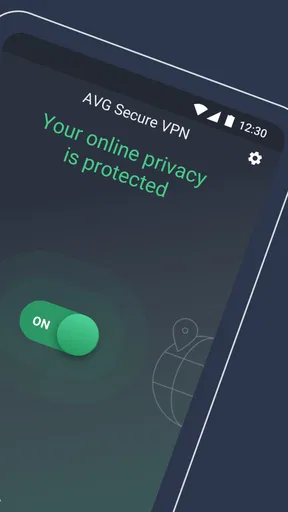
I was immediately struck by how intuitive the app feels. Upon opening, you're greeted with a big, friendly button to turn the VPN on or off—no guesswork involved. The main screen shows your current location and IP address, and switching between servers is just a tap away. It's designed to make you feel in control, even if you're not a tech wizard.
That one-button layout makes the most sense when I decide on a specific occasion to use a VPN: for example, before opening email or a banking app on public Wi-Fi, I can connect first rather than hunt through several settings. I would still check that the VPN indicator is active before sending anything sensitive. A simple interface reduces friction, but it does not remove the need to verify the connection when the moment matters.
For someone who wants a VPN permanently running and carefully tailored to different apps, the experience may feel too basic. I would compare the available controls with my own routine before committing. A simpler screen is a genuine advantage for occasional use, but it is not automatically the best fit for people who want extensive network rules or frequent fine-tuning.
Worth Reading Before You Choose

EA SPORTS FC Mobile 26 Is a Bigger Football Game, but It Takes Time

Flipboard Shows What News Apps Must Do Beyond the Feed

Switching to Android Auto Means Rethinking Your Driving Routine

Google Calendar Makes a Crowded Week Easier to Manage

Ludo King Makes the Most of the Minutes Between Plans

Baby Panda World Brings Quick Play to Modern Phones, but Its Game Library Feels Busy
Security Features
When it comes to security, AVG Secure VPN doesn't mess around. It offers bank-grade encryption to keep your data safe from prying eyes. As someone who's always cautious about online security, this was a huge relief. The app also provides an automatic kill switch, which is like having a safety net in case the VPN connection drops. These features help ensure your online activities remain private and secure.
The practical trade-off is that a VPN can change how some services see your connection. If a site asks for extra verification or an app behaves differently while the VPN is on, I would first test whether reconnecting or choosing another available location resolves it. For tasks that depend on a stable local connection, such as accessing a workplace system, I would follow the employer’s instructions rather than assume a VPN is always appropriate.
I also keep the limits of VPN protection in mind. It does not stop a phishing message from tricking me into sharing a password, and it does not replace device updates or strong, unique credentials. The useful mental model is an added layer between my device and the network, not a substitute for safer habits or a promise that every online risk has disappeared.
Server Selection and Performance
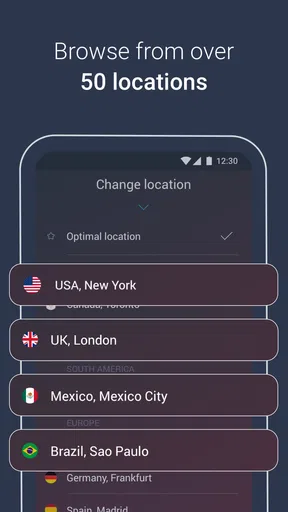
If you're someone who needs speed and a variety of server locations, AVG Secure VPN has got you covered. With servers in over 50 locations, you can easily find one that suits your needs. I tested several to see how they performed, and I was impressed. Streaming content was a smooth experience, with minimal buffering—a crucial factor for binge-watchers like me. Download speeds were consistent as well, making it a solid choice for everyday browsing.
For a more deliberate test, I would compare the same activity with the VPN off and on, using the same network and a nearby server where possible. That makes it easier to tell whether a slowdown comes from the VPN, a weak Wi-Fi signal, or the service itself. If a video pauses, changing to a closer location is a sensible first try; picking a distant server just to make a location appear different can add delay without helping ordinary browsing.
Streaming is a useful convenience, but I would not choose a VPN solely on the assumption that every streaming library will work from every location. Services can change how they treat VPN connections, and a connection that works one day may require a different choice another time. For low-latency gaming or live calls, I would prioritize a nearby server and test the result before relying on it for something important.
That is where AVG’s straightforward approach compares with more configurable VPN apps. If I want to connect quickly and choose a location without tuning lots of settings, this style is appealing. If I need detailed controls or a particular specialist use, I would compare alternatives on those exact requirements instead of assuming a familiar security brand covers every advanced need.
Privacy and No-Logging Policy
Privacy is the name of the game, and AVG takes it seriously. The app follows a strict no-logging policy, meaning they don’t track your online activities—a major plus for those concerned about privacy. They also have strong DNS leak protection, ensuring your internet service provider can't snoop on your online behavior.
For everyday decision-making, I separate the privacy benefit of encrypting traffic on a network from the broader question of how a provider handles information. Anyone choosing a VPN primarily for sensitive work should read the provider’s current privacy terms and decide whether they match their own standards. I would not treat the VPN label alone as proof that an app fits every privacy threat model.
A realistic example is checking travel details while waiting in a café. I can connect before opening a booking account, avoid doing that task over an unsecured connection without protection, and disconnect afterward if I no longer need the tunnel. That routine is more useful than leaving a VPN on without knowing when it helps, especially if I notice a site asking for repeated sign-ins or a local service becoming inconvenient.
Ease of Use and Support
One of the things I appreciate about AVG Secure VPN is how user-friendly it is. Even if you're a VPN newbie, the app guides you through the setup process. If you ever run into issues, their customer support is responsive and helpful. They offer a variety of support options, including a comprehensive FAQ section, live chat, and email support.
My troubleshooting order would be simple: confirm that the device has internet access without the VPN, reconnect, and then try a different location if the original one is unreliable. If only one website fails, I would check that site before assuming the whole VPN is broken. This quick separation of network problems from site-specific problems can save time and avoids repeatedly changing settings without a clear reason.
On a phone used for both work and personal life, I would also consider when a VPN could interfere with local services. Devices such as printers, casting equipment, or workplace tools may depend on seeing the phone on the same local network. If one stops working after connecting, briefly testing with the VPN disconnected can identify the cause; I would only leave it off for a task where that local connection is actually needed.
Pricing and Plans
AVG Secure VPN offers a free trial, which is perfect if you want to take it for a test drive before committing. After that, they have several subscription options, including monthly and yearly plans. While the price is competitive, knowing that you're paying for excellent security and performance makes it worth the investment.
I would treat the trial as a chance to test the app in the places I actually use my phone, rather than just checking whether the main switch works at home. Try the connection on your usual Wi-Fi and mobile network, see whether key apps behave normally, and decide whether you would use it often enough to justify a purchase. Before confirming anything, review the renewal terms and the plan displayed on your device so the cost is clear.
For a person who only needs occasional protection, the best choice depends on the available plan and how often those situations arise. Someone who already pays for a VPN through another service should compare the coverage and controls before adding a second subscription. Likewise, if the main need is blocking malicious links or managing passwords, a VPN by itself is not a direct replacement for tools built for those jobs.
Where It Fits in AVG’s Current App Lineup
AVG Mobile’s VPN has been available since August 31, 2017, and its current version is 3.1.6681. Those details offer a snapshot of the app’s ongoing presence, but they do not by themselves tell me what changed between releases. I would avoid reading a version number as proof of a particular new feature; for users, the more useful check is whether the current build runs properly on their device and includes the controls they need.
Its audience is reflected in its reach: it has more than five million installs, with an average rating of 4.4 from around 81,000 ratings and about 6,700 written reviews. That is a substantial number of people trying it, but popularity does not settle the personal question of whether its locations, speed, and subscription terms suit your own routine. I would use those figures as context, then judge it by a real trial on my own networks.
Existing users do not need to change their routine just because a version number is current. If the app connects reliably and its behavior meets your needs, the sensible habit is to keep it updated through your device’s normal app process and revisit the settings when your needs change. If you depend on it for travel, work, or access to a particular service, test it before leaving home rather than waiting until you need it urgently.
Who Should Choose It—and What to Watch
I’d recommend this app to someone who wants a recognizable, easy-to-operate VPN for routine browsing and occasional use on shared networks. It is less compelling for a person who needs highly granular controls, wants a VPN only for a specialist technical workflow, or expects it to solve unrelated security problems. In those cases, a more configurable VPN or a tool designed specifically for the missing task may be a better match.
The useful questions to ask before relying on it are practical: does it connect on the networks you use, do your everyday apps still work, and does the subscription option make sense for how often you need protection? I would also check the current privacy terms and plan details directly before making a longer-term decision. Those checks are more informative than judging any VPN by a single speed test or a general claim of security.
For me, the strongest reason to consider AVG Secure VPN is that it keeps the basic action—connecting through a VPN—easy to understand. Its trade-offs are the same ones that matter in real use: a VPN can affect speed and access, and a straightforward design may not satisfy people seeking advanced configuration. If your needs are modest and its current terms suit you, it is a convenient option to try; if your requirements are specific, compare those requirements first.
In conclusion, AVG Secure VPN Proxy & Privacy is a solid choice for anyone looking to enhance their online privacy. With its user-friendly interface, robust security features, and extensive server network, it's a reliable companion for both beginners and seasoned VPN users. Whether you're streaming, browsing, or just want to keep your data safe, AVG Secure VPN has your back.
Pros
- User-friendly interface for easy navigation.
- Fast connection speeds with minimal lag.
- Supports multiple devices simultaneously.
- Strong encryption for enhanced security.
- Wide range of server locations globally.
Cons
- Limited free trial period for testing.
- Certain features require premium subscription.
- May slow down internet on older devices.
- Occasional connection drops in some regions.
- Not all servers support streaming services.
FAQs for AVG Secure VPN Proxy & Privacy
What is AVG Secure VPN Proxy & Privacy and what does it do?
AVG Secure VPN Proxy & Privacy is a virtual private network (VPN) service designed to enhance your online privacy and security. It encrypts your internet connection, allowing you to browse the web anonymously and access geo-restricted content. The app masks your IP address, providing an additional layer of protection against hackers and trackers.
Is AVG Secure VPN Proxy & Privacy safe to use?
Yes, AVG Secure VPN Proxy & Privacy is safe to use. It employs military-grade encryption to protect your data and ensures that your online activities remain private. The app is developed by AVG, a reputable company known for its security products, which adds an extra level of trust and reliability.
How does AVG Secure VPN affect my internet speed?
Using AVG Secure VPN may slightly reduce your internet speed because your data is encrypted and routed through a secure server. However, the impact is generally minimal and depends on factors such as server location and your original internet speed. Most users find the trade-off for enhanced privacy and security worthwhile.
Can I use AVG Secure VPN for streaming geo-restricted content?
Yes, AVG Secure VPN allows you to access geo-restricted content by connecting to servers in different countries. This means you can stream shows, movies, and other content that might not be available in your region. However, keep in mind that streaming services continuously update their VPN detection measures, which might affect access.
What platforms is AVG Secure VPN available on?
AVG Secure VPN is available for a variety of platforms, including Android and iOS devices as well as Windows and macOS computers. This cross-platform availability ensures that you can protect your privacy and secure your internet connection across multiple devices, making it a versatile choice for users.


